Purpose of the tool
Procedure
Settings
Interpretation guide
Forms of representation
Requirements
Tools
Examples
Terms
Formulas
Boxplot
-
Purpose of the tool
A boxplot is a graphical tool used to illustrate the distribution of a measured variable. It not only shows the location and spread of the data but also highlights outliers. Because of its compact format, different data sets can be quickly compared with one another—for example, before and after a process improvement, or between different machines, shifts, or material batches.
-
Example tomato sauce:
Viscosity measurements are routinely taken during the production of tomato sauce. To get an initial overview of the distribution, a boxplot is created. This shows at a glance how symmetrical or skewed the data distribution is and whether there are any outliers.
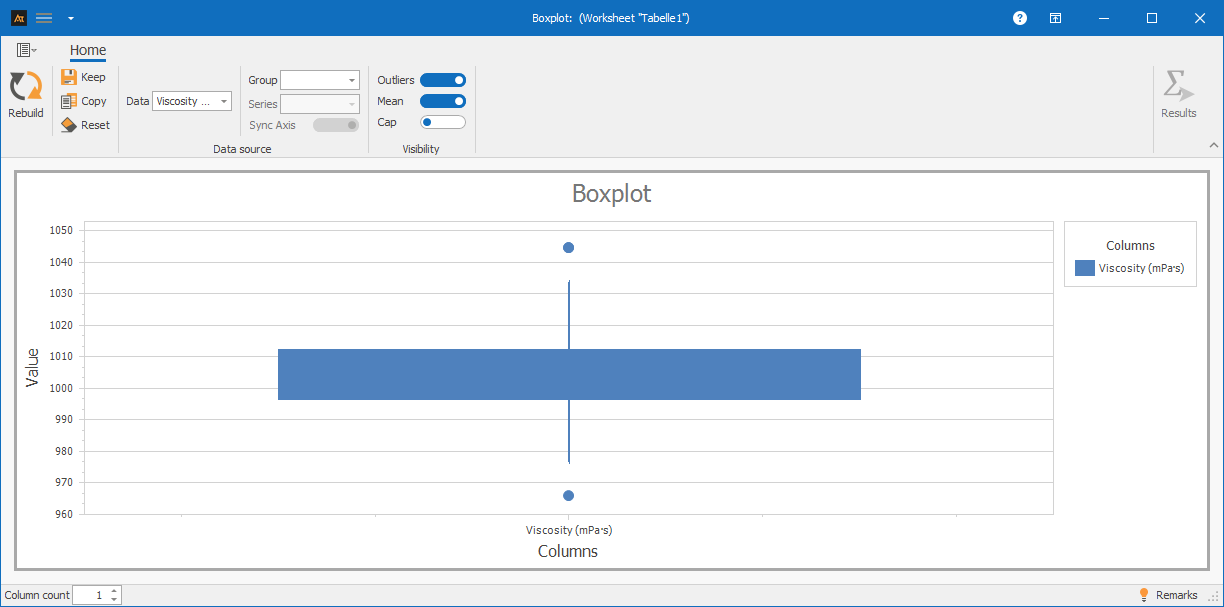
Explanations of the results:
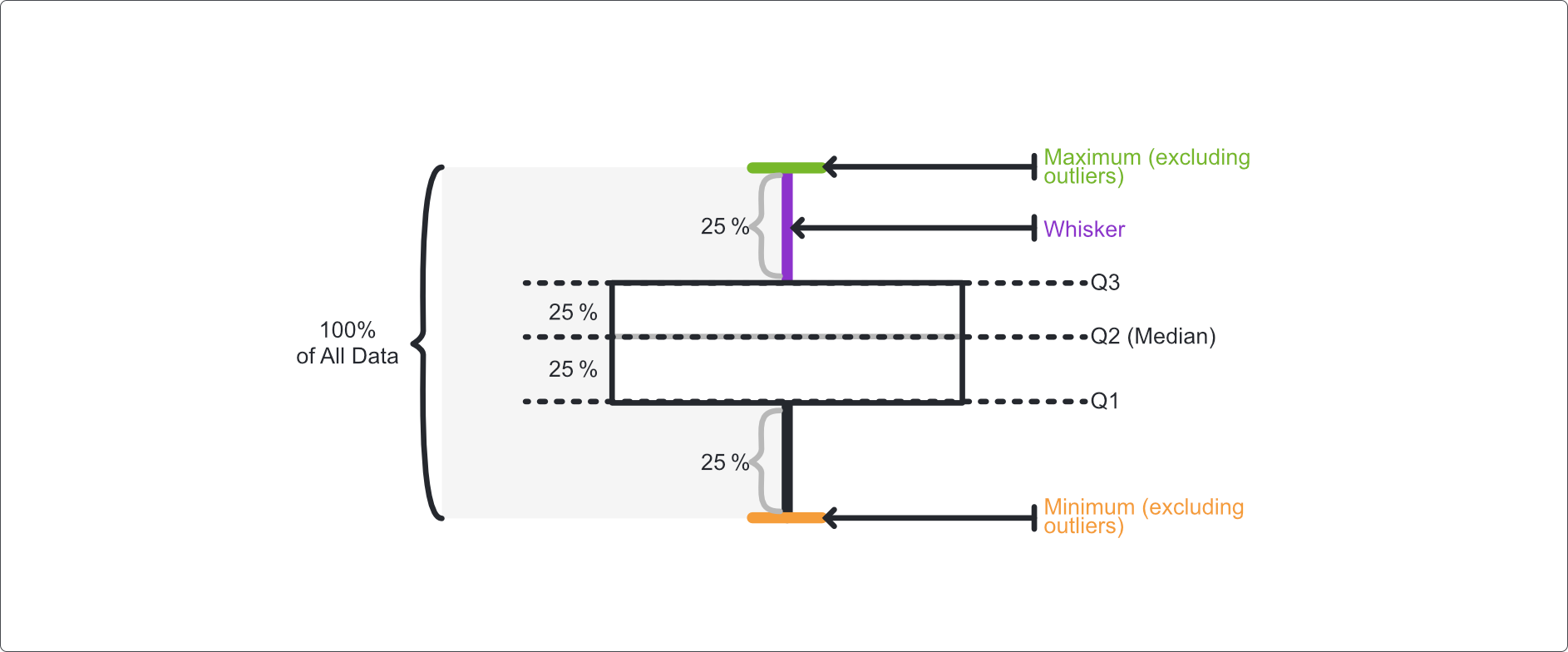
A boxplot consists of several elements that together describe the distribution of the data:
- Median: The line inside the box indicates the middle value of the data.
- Box (interquartile range): It encompasses the middle 50% of all values, i.e., the range between the 25th and 75th percentiles.
- “Whiskers” (antennas): These lines indicate the range of values outside the box. Typically, a whisker extends up to 1.5 times the interquartile range.
- Outliers: Values outside the whiskers are displayed as individual points.
-
Procedure
(How was this graphic created?)
Preliminary Work
- Select a continuous measurement parameter and collect measurement data (e.g., viscosity).
 Use in AlphadiTab
- In the Measure phase, select the Boxplot tool.
- Select “Viscosity” for the data.
- Generate the chart using the “Create New” button.
Interpretation
- Is the median located in the center of the box? → Symmetrical distribution.
- Is the box significantly shifted or uneven in width? → Indication of skewness.
- Are there outliers? → Check the data; analyze causes if necessary.
- Are multiple boxplots displayed? → Compare the median, box width, and whisker length between the groups.
-
Interpretation Guide
General Overview
- What is the position of the box (median)?
- What is the dispersion of the data (box width / whiskers)?
- Are there any outliers?
- Is the median located in the center of the box or near one of the box edges?
- Is one whisker significantly longer than the other?
For known specifications
- Does the location match the target value?
- Is the variation within the specification window?
For multiple boxplots
- Is the position the same for all boxplots?
- Is the spread the same for all boxplots?
-
Forms of presentation
Various display options are available for boxplots. The chart’s appearance changes depending on whether one or more data series, as well as additional groups or series, are selected. Data can thus be visualized in groups or broken down by series and compared specifically with one another. All of the following display formats are based on the same file but differ in the selection of columns used. The procedure for each is described in the individual tiles.
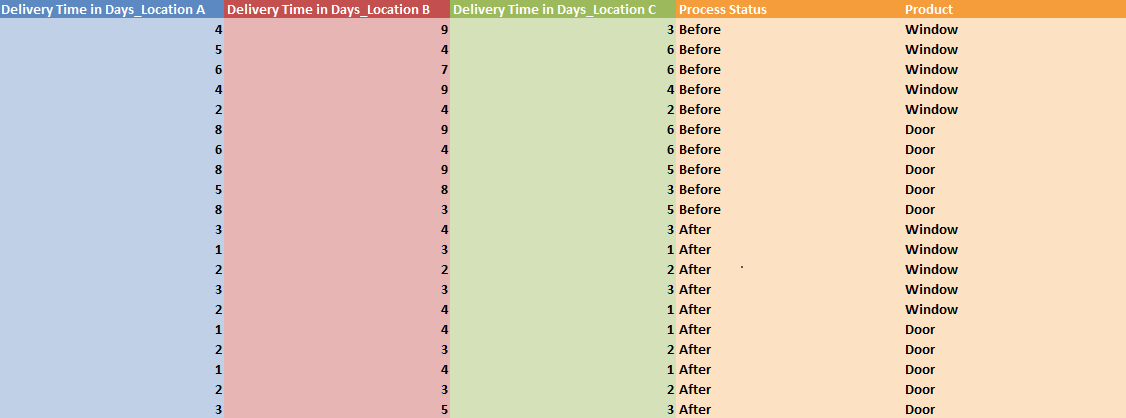
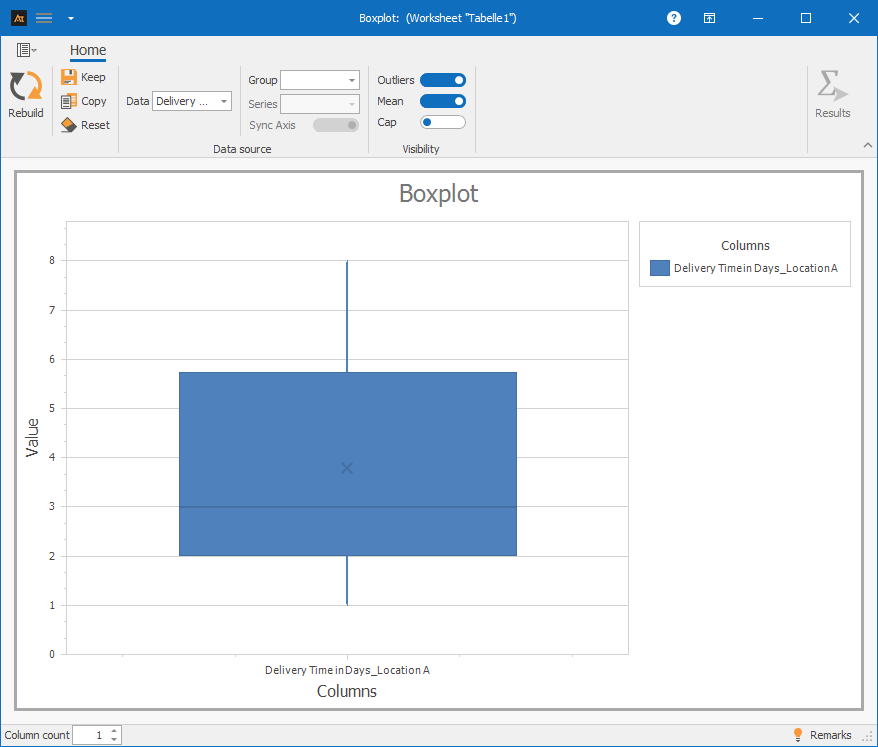
A data series: Column A
Procedure:
Step 1: Select only column A in the data
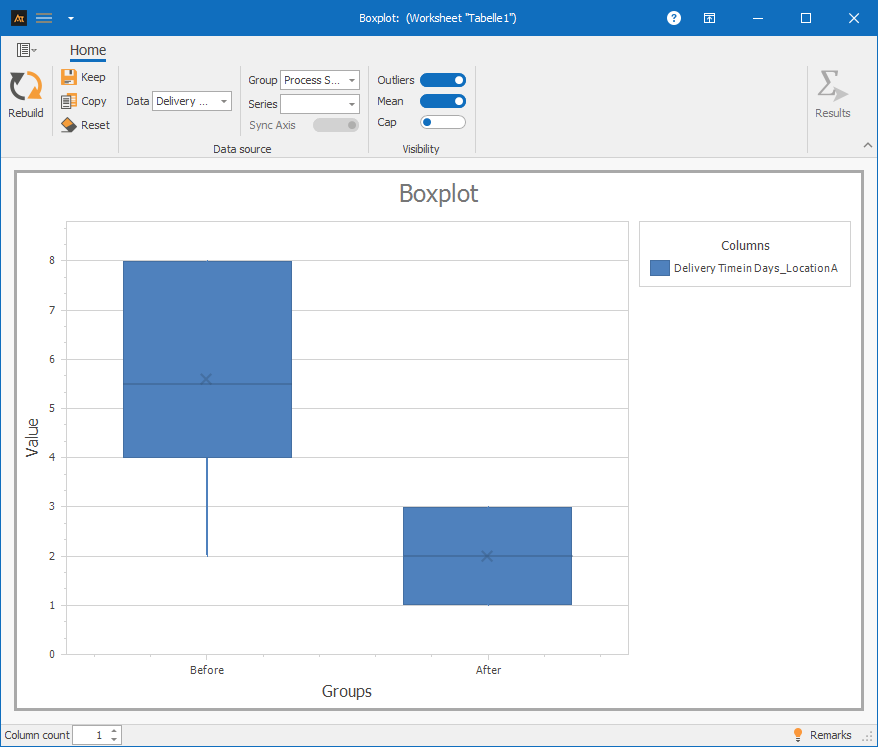
A data series and group: Column A and Column D
Procedure:
Step 1: Under “Data,” select only column A
Step 2: Under “Group,” select column D (Process Status)
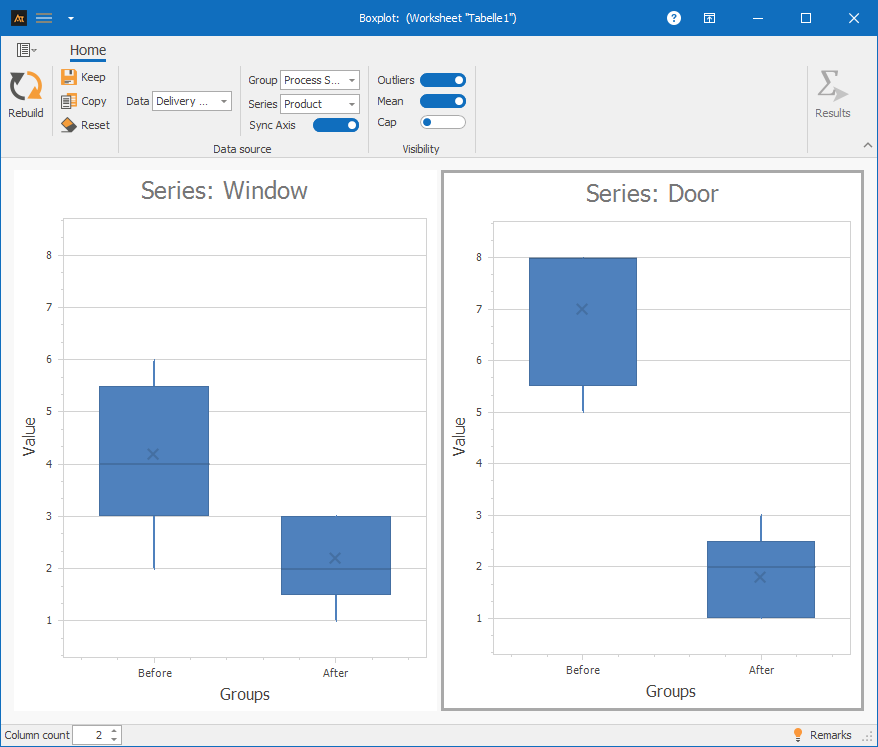
A dataset with group and series: Columns A, D, and E
Procedure:
Step 1: Under “Data,” select only column A.
Step 2: Under “Group,” select column D (Process Status).
Step 3: Under “Series,” select column E (Product).
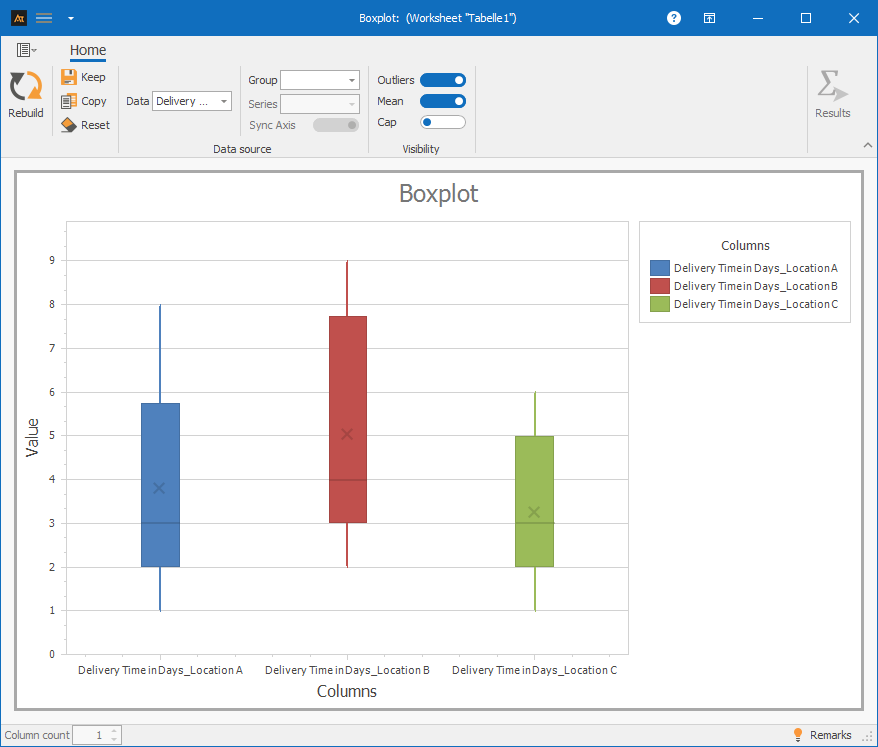
Multiple data sets: Columns A–C
Procedure:
Step 1: Select columns A–C in the data.
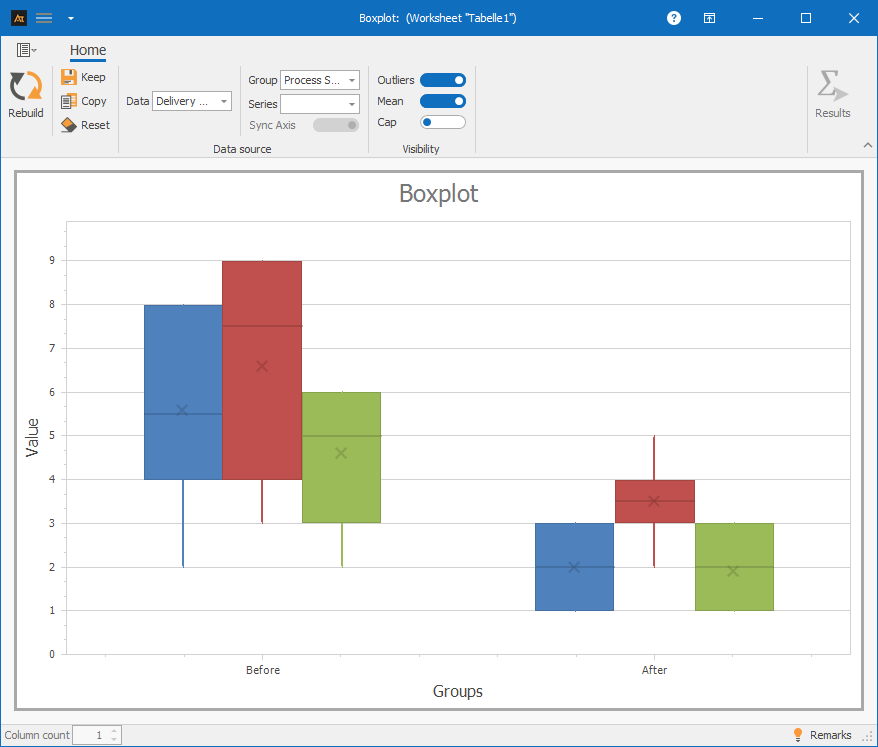
Multiple data sets with groups: Columns A–D
Procedure:
Step 1: Under “Data,” select columns A–C.
Step 2: Under “Group,” select column D (Process Status).
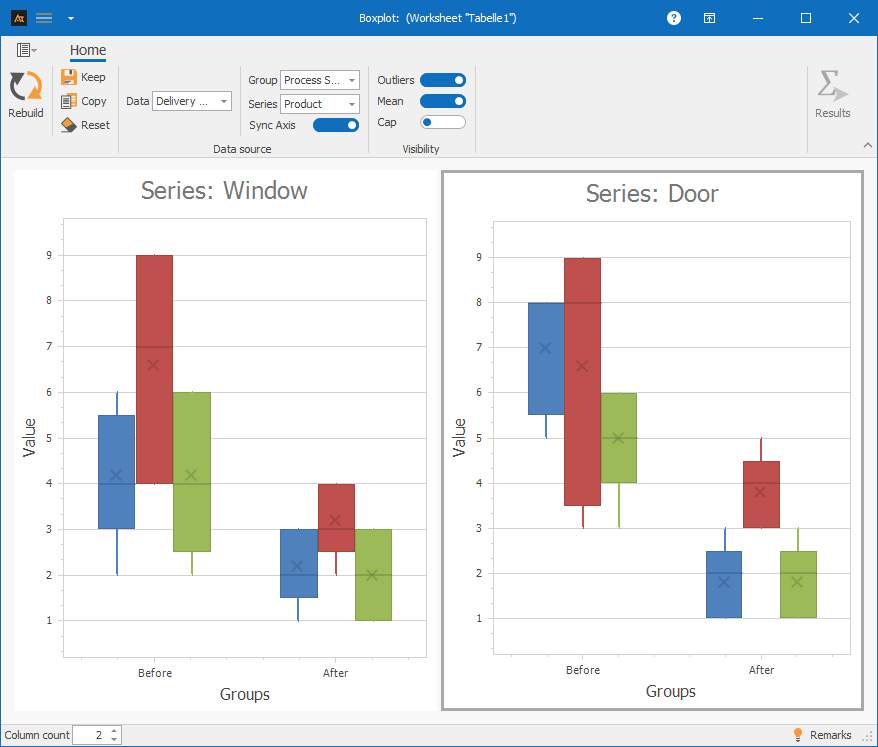
Multiple data sets with groups and series: Columns A–E
Procedure:
Step 1: Under “Data,” select columns A–C
Step 2: Under “Group,” select column D (Process Status)
Step 3: Under “Series,” select column E (Product)
-
Requirements
- At least quantitative data (countable or measurable data)
- A suitable measuring instrument, since outliers can often result from measurement errors.
-
Tools
(When are other options more suitable?)
- Data is nominal or ordinal → bar chart
Development
Development of the old vs. new formula
A new formulation is currently being tested in the development phase. The boxplot is intended to determine whether the viscosity of the new formulation follows a similar distribution pattern to that of the previous formulation.
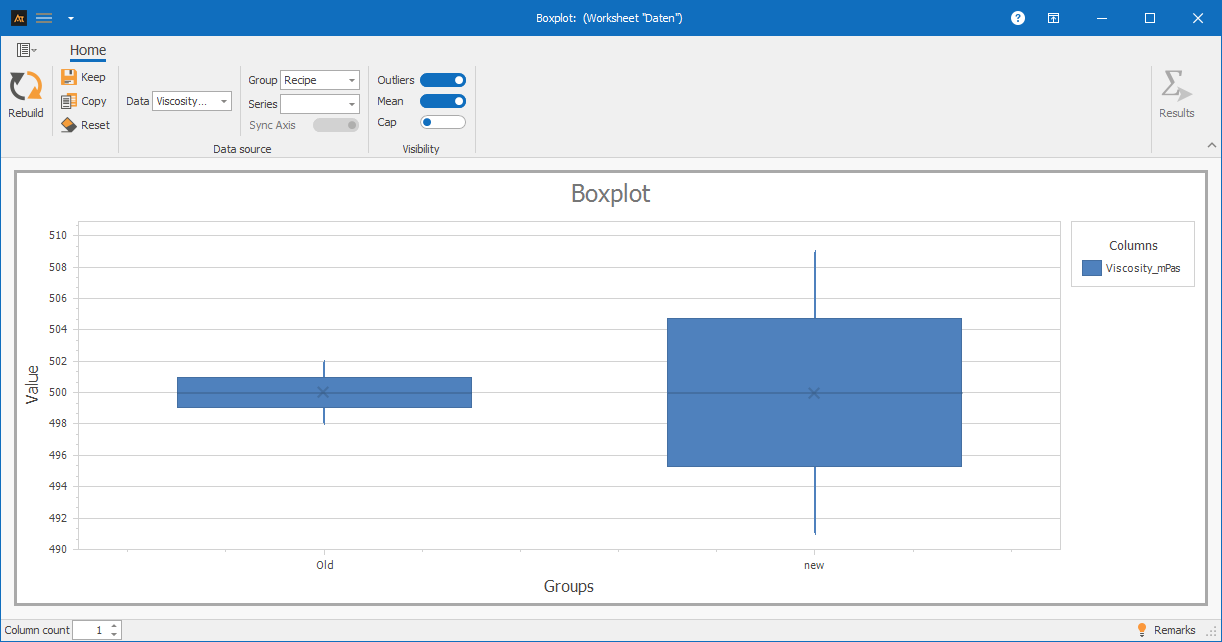
The boxplot shows that the viscosity values for the old and new formulations differ only slightly, as the medians are virtually identical. However, the new formulation exhibits significantly greater variation, as indicated by the wider box and longer whiskers.
This suggests that the new formulation achieves comparable viscosity values on average but has poorer dispersion.
Production/Quality Assurance
Quality assurance found that some viscosity values were outside the expected range. The next step is to determine whether this issue occurs on all production lines or only on certain ones.
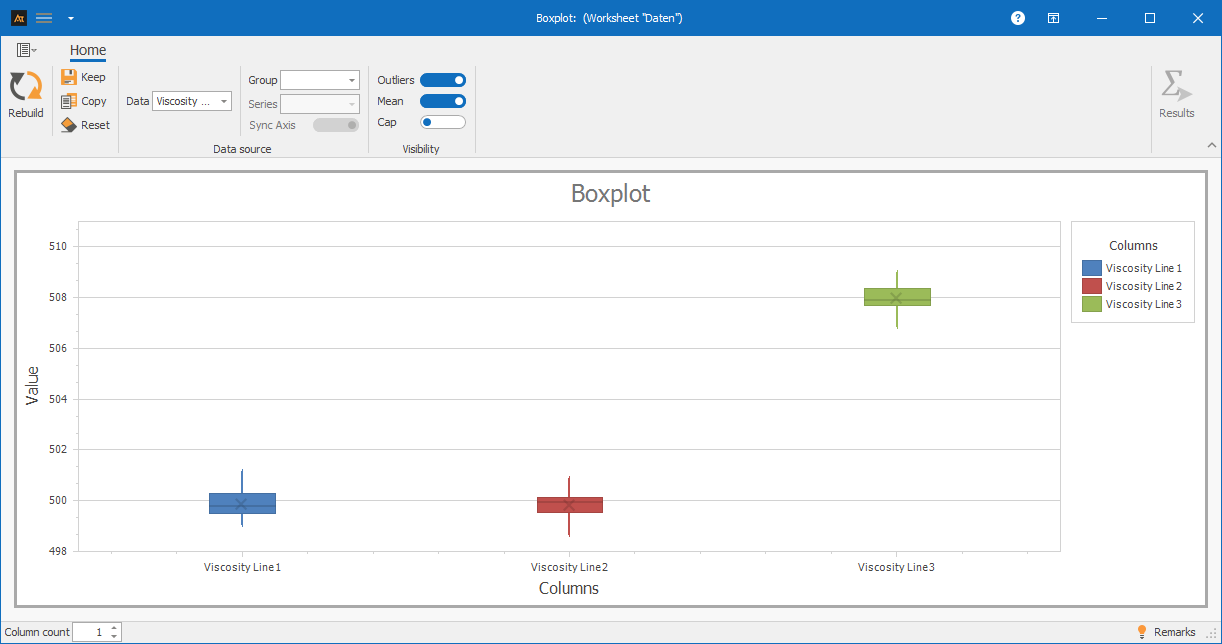
The boxplot shows that production lines 1 and 2 have similar viscosity distributions and ranges. Production line 3, however, differs significantly in terms of distribution, as its median is higher than that of the other lines.
The range is comparable across all three lines.
Service
IT Ticket Resolution Time by Location
The IT service desk handles requests from multiple locations. Although the same service processes apply, the operating conditions may vary between locations—for example, due to different ticket types, time zones, or organizational workflows.
A boxplot will be used to determine whether the distribution of ticket turnaround times differs between locations.
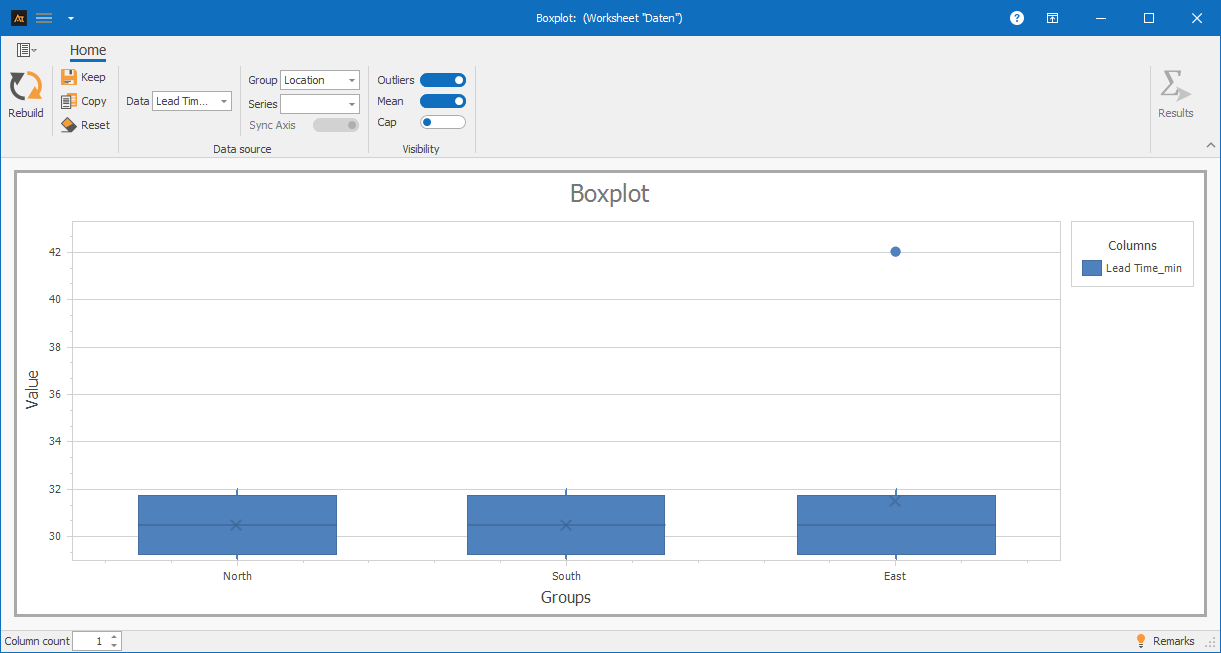
In the boxplot, the medians of the turnaround times at all locations are at a similar level. At the same time, a single outlier is visible at the East location.
This shows that the average turnaround times do not differ significantly between locations, but that isolated instances of exceptionally long processing times do occur. The boxplot clearly highlights these outliers without significantly altering the central tendency.
Sales
Sales ratio by region
The sales department handles sales opportunities in several regions. Although the same products are offered, market conditions, customer types, and the intensity of competition may vary.
A boxplot will be used to determine whether the distribution of sales rates differs across regions.
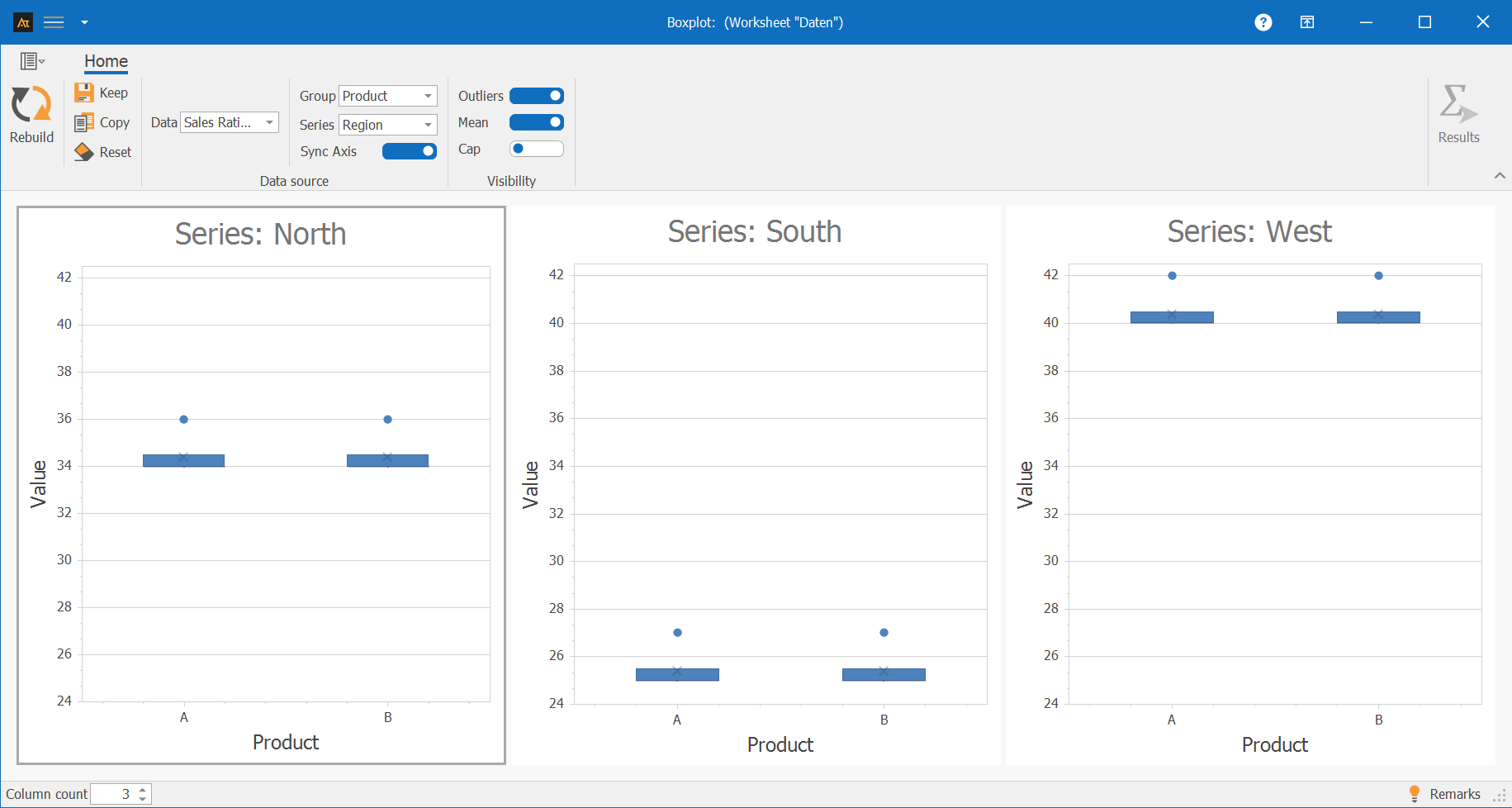
The boxplot shows clear differences in sales quotas across regions. The Western region has higher sales quotas overall, while the Southern region shows lower values. The variation within the regions is comparable.
The boxplot is particularly well-suited here for clearly illustrating regional differences in sales performance without evaluating individual deals or individuals. It is notable that the whiskers are identical to the boxes. This occurs when the measured values are very similar and, for example, there are no decimal places due to the resolution of the measuring instrument.
Logistics
Delivery time to the logistics center
In logistics, customer orders are processed across multiple distribution centers. Although the same processes and systems are used, delivery times may vary due to differences in workload, infrastructure, or regional conditions.
A boxplot will be used to determine whether the distribution of delivery times differs between the distribution centers.
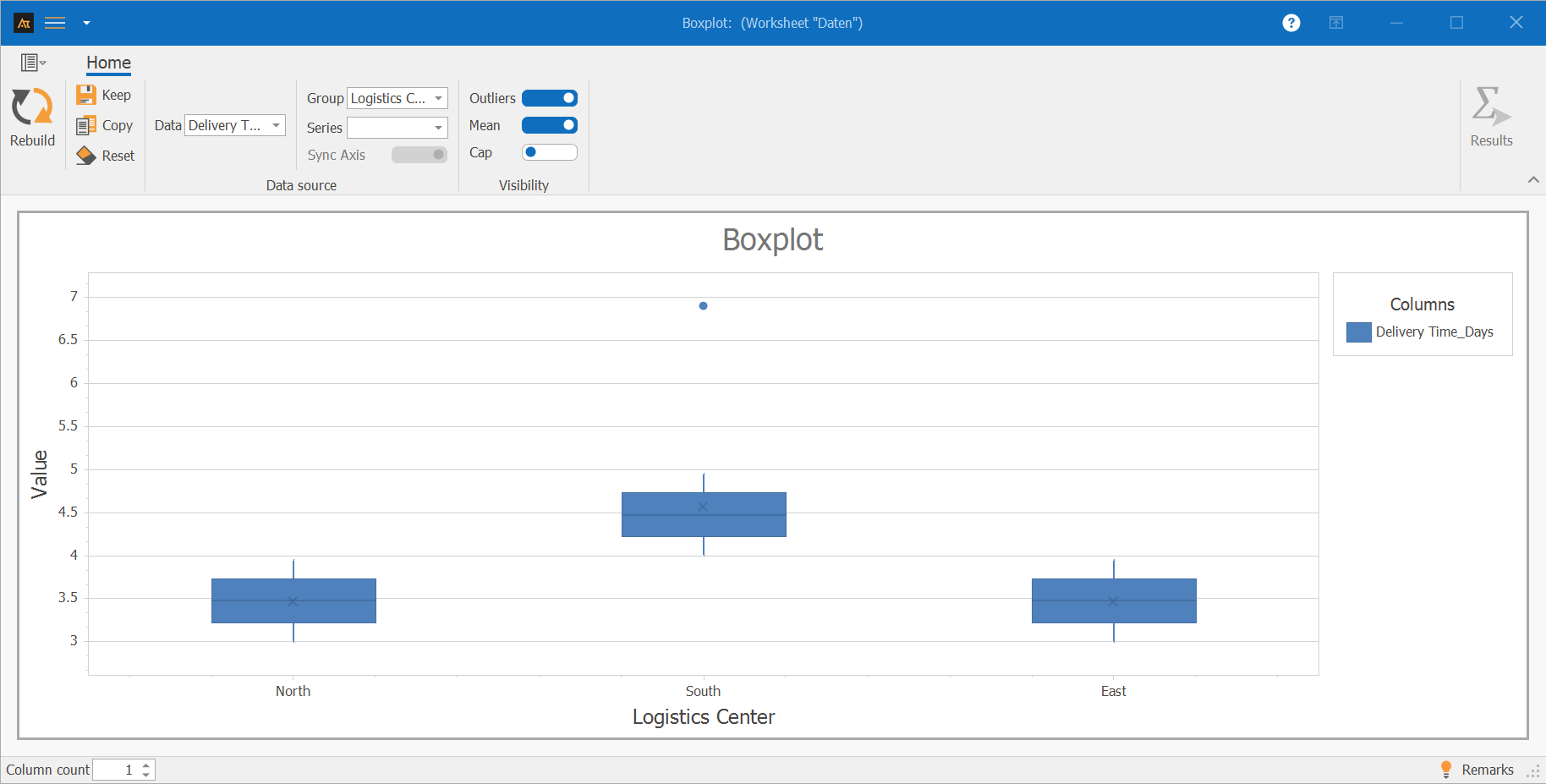
In the boxplot, the medians of the turnaround times at all locations are at a similar level. At the same time, a single outlier is visible at one location.
This shows that typical turnaround times do not differ significantly between locations, but that exceptionally long processing times occur in isolated cases. The boxplot clearly highlights these outliers without significantly altering the central tendency of the data.
Purchasing
Supplier Comparison
In purchasing, materials are sourced from various suppliers. A boxplot will be used to determine whether there are differences in the distribution of delivery times or quality metrics among the suppliers. On-time delivery rate [%] indicates how often deliveries arrive on time. A delivery is considered on time if it arrives within the agreed-upon delivery window. On-time delivery is calculated as the percentage of on-time deliveries.
On-time delivery is calculated for each week, e.g.:
\( \text{On-time delivery}\,[\%] = \frac{\text{on-time deliveries}}{\text{total deliveries}} \cdot 100 \)
For the bo plot, delivery reliability is calculated over several calendar weeks. Each data point corresponds to a supplier’s delivery reliability in a given week. The boxplot thus shows the distribution of delivery reliability over time and allows for a comparison between suppliers.
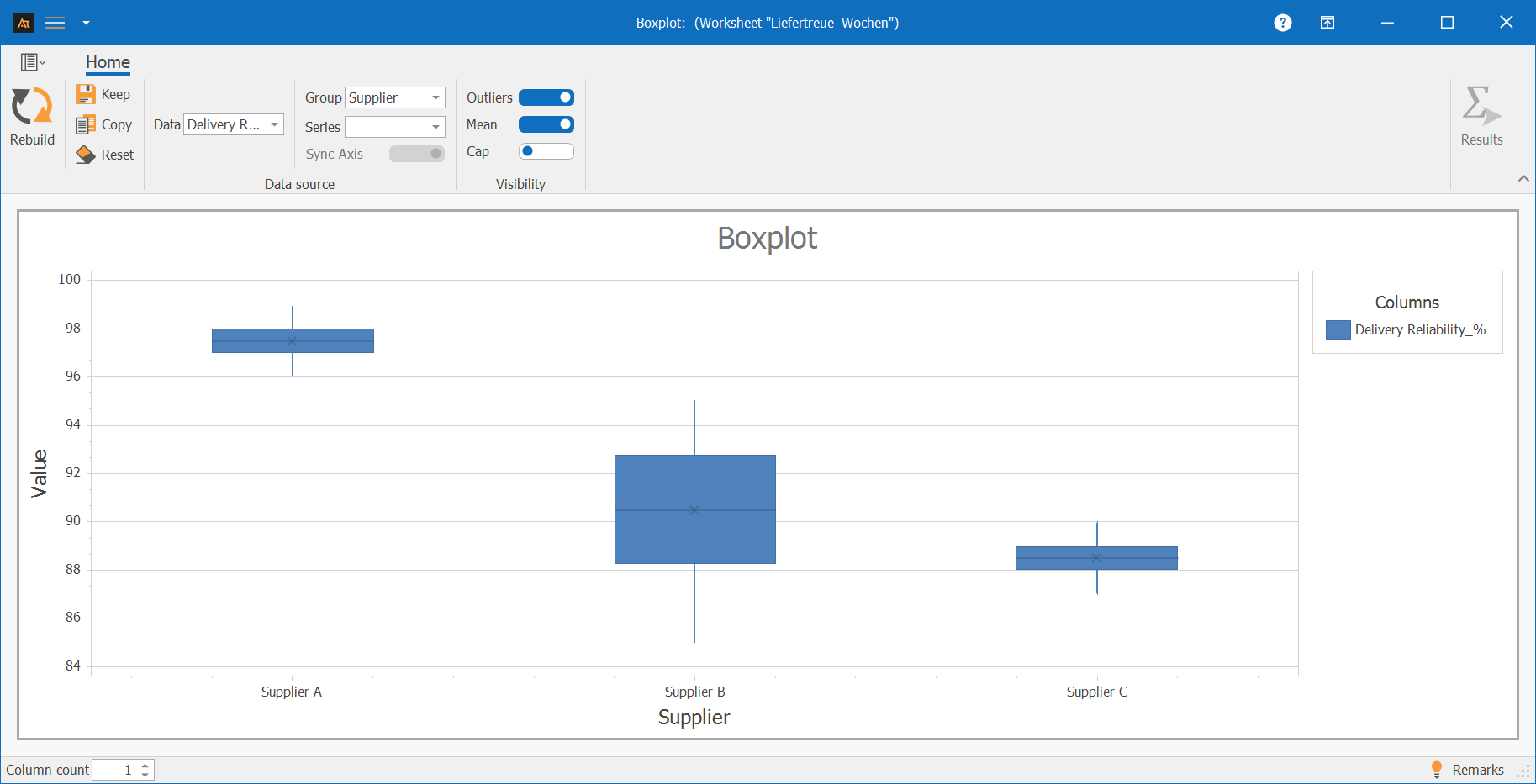
The boxplot shows differences in the distribution and variability of on-time delivery rates among the suppliers. Supplier A exhibits a high on-time delivery rate with little variation, as reflected by a high median and a narrow box.
Supplier C also shows low variation, but has a lower average on-time delivery rate. Supplier B has the greatest variation and shows a slightly better on-time delivery rate than Supplier C but a worse one than Supplier A.
Planning
Forecast deviation
In production planning, demand forecasts are created. A boxplot is used to analyze whether the distribution of forecast variances differs between various products or planning periods.
The forecast variance is calculated by comparing the planned demand with the actual demand. To present the variance in a comparable way, it is expressed as a percentage.
The calculation is as follows:
\( \text{Forecast deviation}\,[\%] = \frac{\text{planned demand} – \text{actual demand}}{\text{actual demand}} \cdot 100 \)
- A positive value means that the demand was overestimated.
- A negative value means that demand was underestimated.
- A value close to 0% indicates a very accurate forecast.
By expressing the results as percentages, forecast deviations can be compared independently of absolute quantities and clearly displayed in a boxplot.
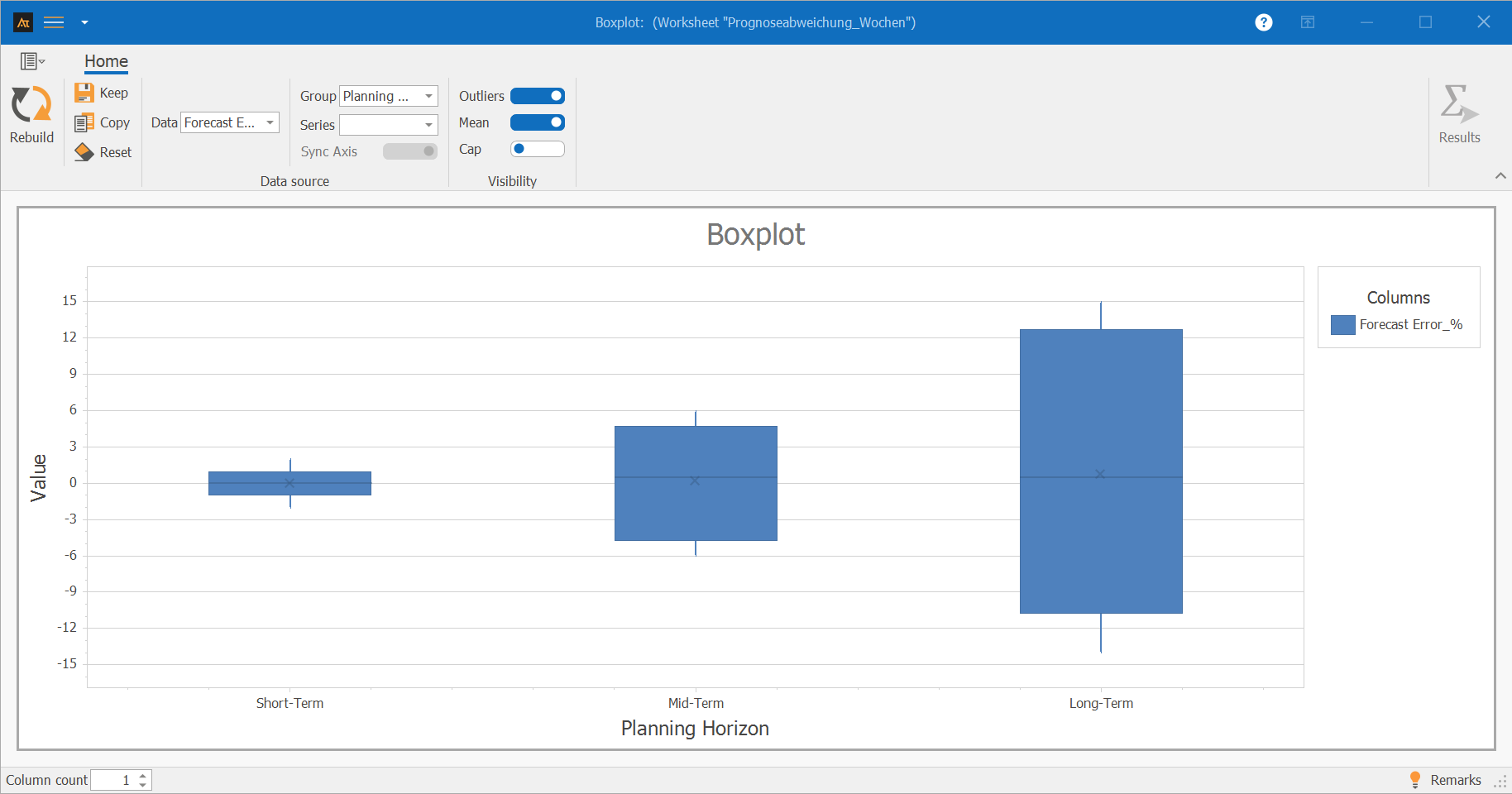
The boxplot shows clear differences in the location and spread of forecast deviations across the planning horizons. Short-term planning exhibits low variability and a location close to 0%.
In medium-term planning, both the dispersion and the deviation from the target value are greater. Long-term planning shows the greatest dispersion as well as significant positive and negative deviations. The boxplot thus illustrates that forecast uncertainty increases significantly as the planning horizon lengthens.
-
Terms
Median: The central value of the sorted data.
Quartiles: Values that divide the data into four equal sections.
Interquartile range (IQR): The difference between the 75th and 25th percentiles.
Whiskers: The range that extends the data beyond the box.
Outliers: Data points that lie outside the typical range of values.
-
Formulas
Mean
\( \mathrm{x̄}=\frac{\sum_{i=1}^{\mathrm{n}}\mathrm{x}_i}{\mathrm{n}} \)
General quartile formulas
Given a sorted data series with \( \mathrm{n} \) data values.
\( \mathrm{x}_{(1)} \le \mathrm{x}_{(2)} \le \dots \le \mathrm{x}_{(\mathrm{n})} \)
Position of the quartiles
Position Q1:
\( \mathrm{r}_1=\frac{\mathrm{n}+1}{4} \)
Position Q2 (median):
\( \mathrm{r}_2=\frac{\mathrm{n}+1}{2} \)
Position Q3:
\( \mathrm{r}_3=\frac{3(\mathrm{n}+1)}{4} \)
Decomposition of the position r
The position r can be decomposed into the digit before the decimal point (here N) and the digit after the decimal point (here p):
\( \mathrm{r}=\mathrm{N},\mathrm{p} \)
Interpolation formula for calculating the quartiles
If \( \mathrm{r} \) is not an integer:
\( \mathrm{Q}=\mathrm{x}_{(\mathrm{N})}+\mathrm{p}\cdot\left(\mathrm{x}_{(\mathrm{N}+1)}-\mathrm{x}_{(\mathrm{N})}\right) \)
Here, (x(N)) denotes the (N)-th value of the sorted data series.
If \( \mathrm{r} \) is an integer:
\( \mathrm{Q}=\mathrm{x}_{(\mathrm{r})} \)
Example with ( n = 10 ):
Data series: x1 = 3, x2 = 4, x3 = 5, x4 = 7, x5 = 8, x6 = 10, x7 = 10, x8 = 11, x9 = 14, x10 = 15
Position of Q1
\( \mathrm{r}_1=\frac{\mathrm{n}+1}{4}=\frac{11}{4}=2{,}75 \)
\( \mathrm{r}_1=\frac{\mathrm{n}+1}{4}=\frac{11}{4}=\underset{\mathrm{N}=2}{\underset{\downarrow}{2}}{,}\underset{\mathrm{p}=0{,}75}{\underset{\downarrow}{75}} \)
Interpolation with x2 = 4 and x3 = 5:
\( \mathrm{Q}_1=4+0{,}75\cdot(5-4) \)
Result
\( \mathrm{Q}_1=4{,}75 \)
-
Keywords