Purpose of the tool
Procedure
Settings
Interpretation guide
Forms of representation
Requirements
Tools
Examples
Terms
Formulas
Correlation diagram
-
Purpose of the tool
The correlation diagram is used to graphically represent the relationship between two variable quantities.
It answers the question of whether, in which direction, and how strongly two variables are related to each other.
Each point in the diagram represents a pair of values consisting of an influencing variable (x) and a target variable (y).
The distribution of the points shows whether there is a positive, negative, or no correlation between the variables under consideration.
The correlation diagram is particularly suitable for:
- the investigation of influencing factors on a target variable
- continuous measured variables (e.g., time, temperature, quantity, viscosity)
- initial visual inspection of possible correlations without model assumptions
-
Example tomato sauce:
The development department for new tomato sauces is investigating how cooking time affects the viscosity of the product.
To this end, tomato sauces with different cooking times are produced in several test series.
For each test series, the cooking time and the resulting viscosity are measured and recorded as a pair of values.
A correlation diagram is used to examine whether and how the relationship between cooking time and viscosity is reflected in the measurement data.
The basic relationship is well known in the industry:
Prolonged cooking causes water to evaporate, which generally results in the tomato sauce having a higher viscosity.
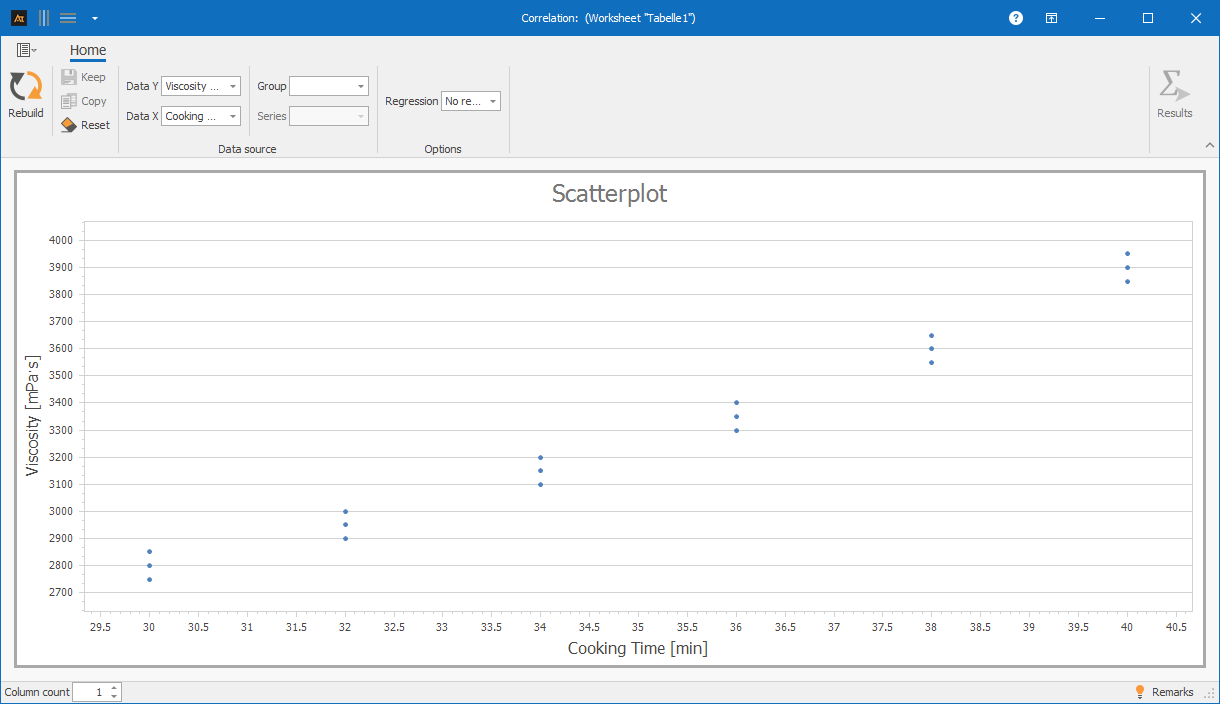
Explanations of the graph:
The scatter plot shows the viscosity of the tomato sauce as a function of cooking time.
The measured viscosity increases with increasing cooking time.
The points lie approximately on a straight line, indicating a clear positive, almost linear relationship between cooking time and viscosity.
For the same cooking times, a slight dispersion of the measured values can be seen.
-
Procedure
(How was this graphic created?)
Preliminary work
- Define the target variable (y) (e.g., viscosity of tomato sauce)
- Define the influencing variable (x) (e.g., cooking time)
- Ensure that both variables are quantitative measures
- Collect data
 Use in AlphadiTab
- In the Measure phase, select the Correlation Diagram tool
- For data X, select the “Cooking time” column
- For data Y, select the “Viscosity” column
- Generate the diagram using the “Create new” button.
Interpretation
- Check whether a correlation between the x and y axes is apparent
- Assess whether the correlation is positive, negative, or non-existent
- Assess whether the correlation is approximately linear
- Compare the point clouds between series or groups, if available.
-
Interpretation guide
General observation
- Are the points arranged in order or randomly distributed?
- Is there a discernible pattern to the points?
- Can the pattern be described by a straight line?
- If yes: Is the correlation positive or negative?
- If not: Does the pattern indicate a non-linear correlation?
- Is the dispersion of the points small or large?
For known specifications
- Are the measured values within the defined specification limits?
- Are there areas of the influencing variable in which the specification is not met?
- Does the relationship change near the specification limits?
Note: A discernible correlation does not necessarily mean that one variable is the cause of the other.
-
Forms of representation
Various display formats are available for correlation diagrams. The display in the diagram changes depending on whether one or more data series and additional groups or series are selected. Data can thus be grouped or broken down by series for visualization and targeted comparison. All of the following display formats are based on the same file, but differ in the selection of columns used. The respective procedure is described in the individual tiles.
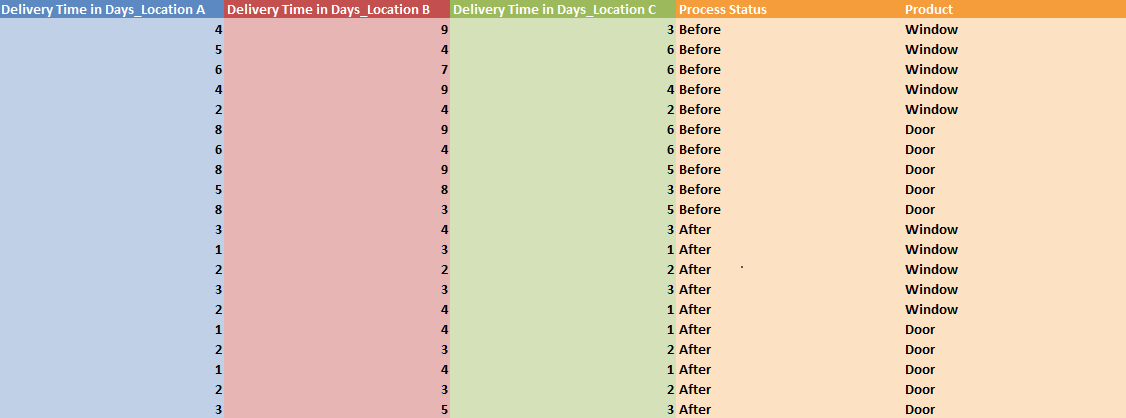
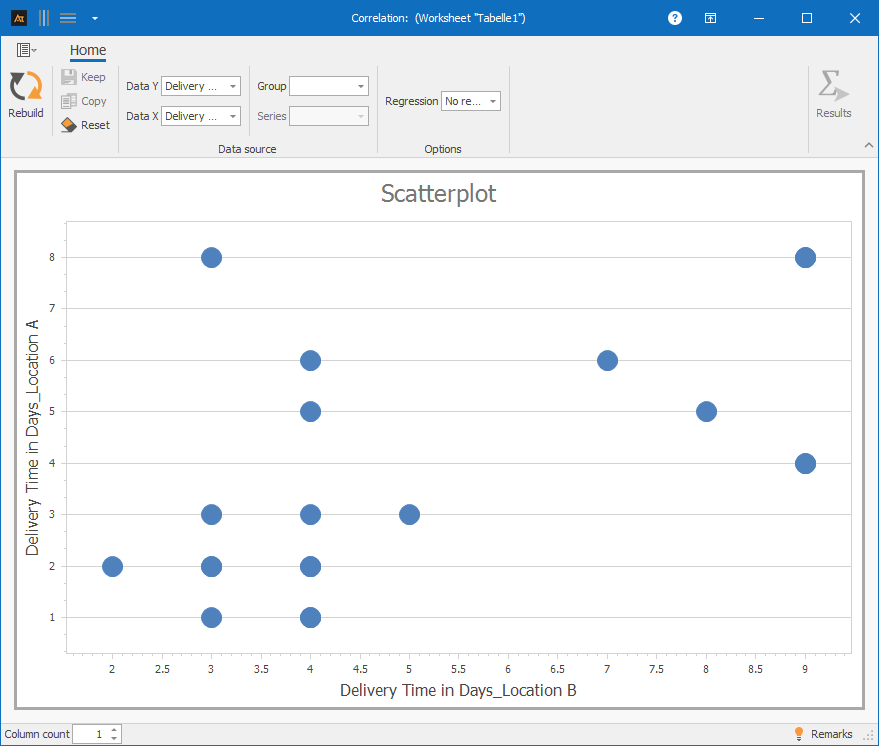
One data series per axis: Column A, Column B
Procedure:
Step 1: Select column A in the Y data.
Step 2: Select column B in the X data.
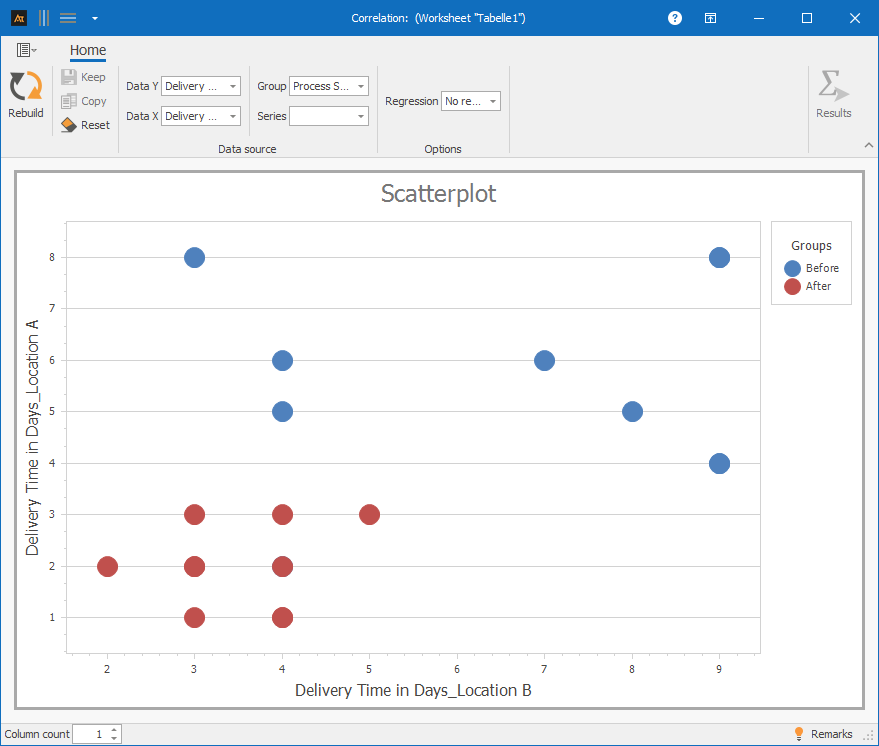
One data series per axis and group: Column A and Column D
Procedure:
Step 1: Select column A for data Y.
Step 2: Select column B for data X.
Step 3: Select column D (process status) for group.
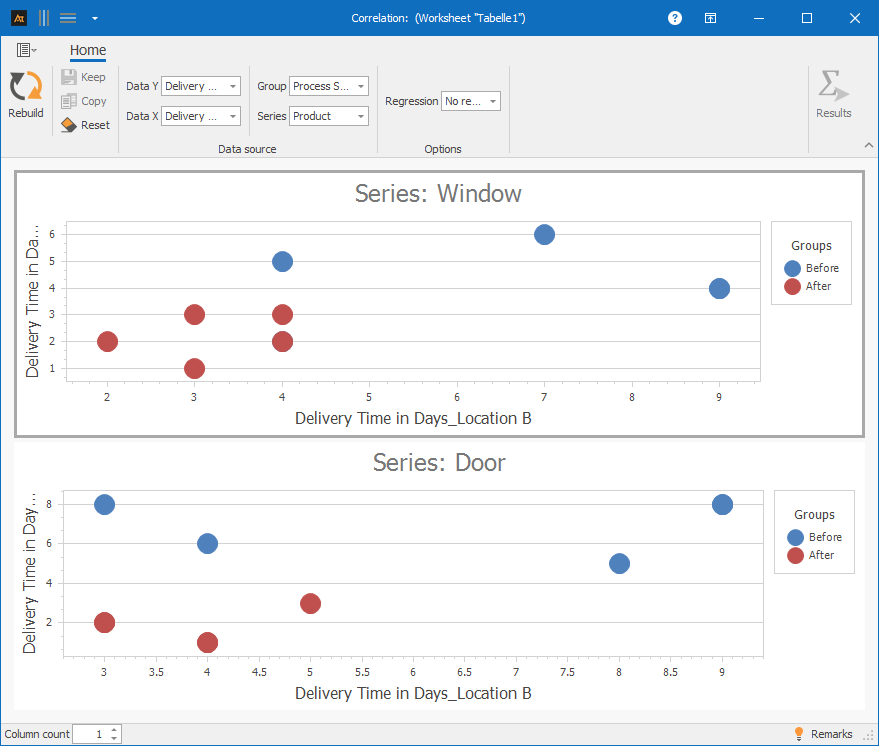
One data series per axis with group and series: columns A, B, D, and E
Procedure:
Step 1: Select column A for data Y.
Step 2: Select column B for data X.
Step 3: Select column D (process status) for group.
Step 4: Select column E (product) for series.
-
Requirements
- Two quantitative variables
-
Tools
(When are others more suitable?)
- If only a single variable is considered and no correlation is to be analyzed → histogram or box plot.
- If categories are to be compared with each other → bar chart or box plot.
- If the focus is on developments over time → time series chart.
- If a correlation is to be demonstrated.
Development
Cooling time and material hardness
In the development of a new component, research is being conducted into how the cooling time after heat treatment affects the hardness of the material.
It is assumed that a longer cooling time results in lower material hardness.
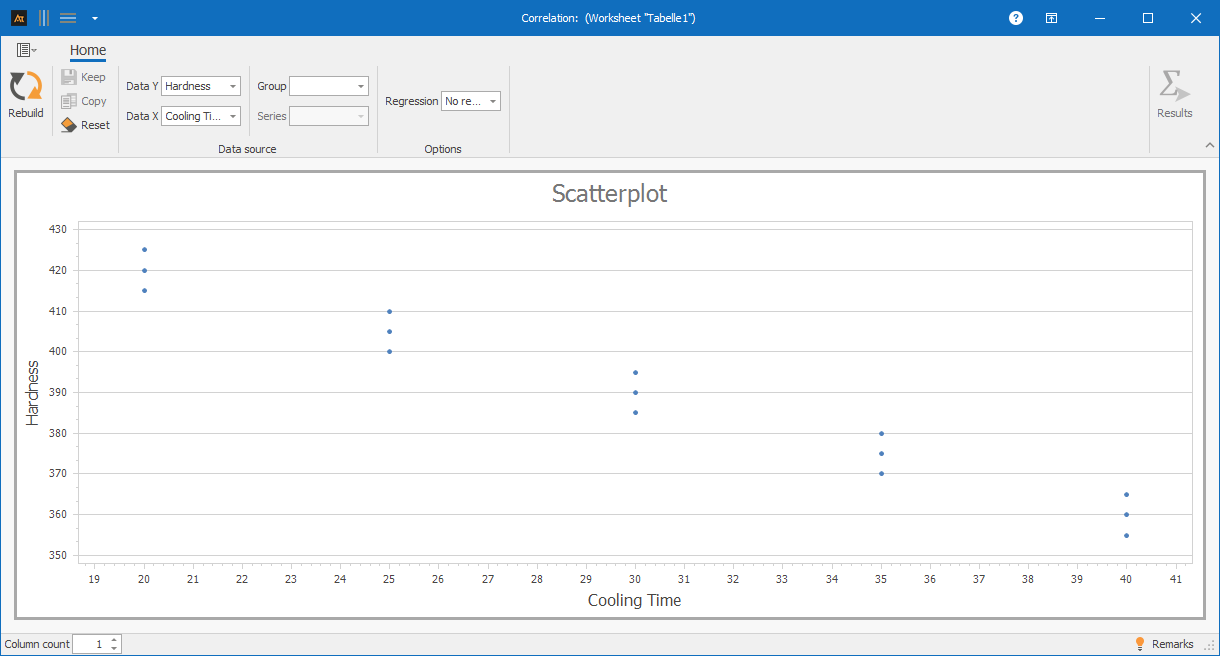
The correlation diagram shows a negative correlation between cooling time and material hardness.
The measured hardness decreases as the cooling time increases.
Quality assurance
Comparison of production and QA measurements
In production, a quality characteristic is measured inline, e.g., the filling quantity.
In quality assurance, the same characteristic is checked again using a separate measuring device.
To investigate whether the measured values from production and quality assurance are consistent with each other, both measured values are recorded as a value pair and displayed in a correlation diagram.
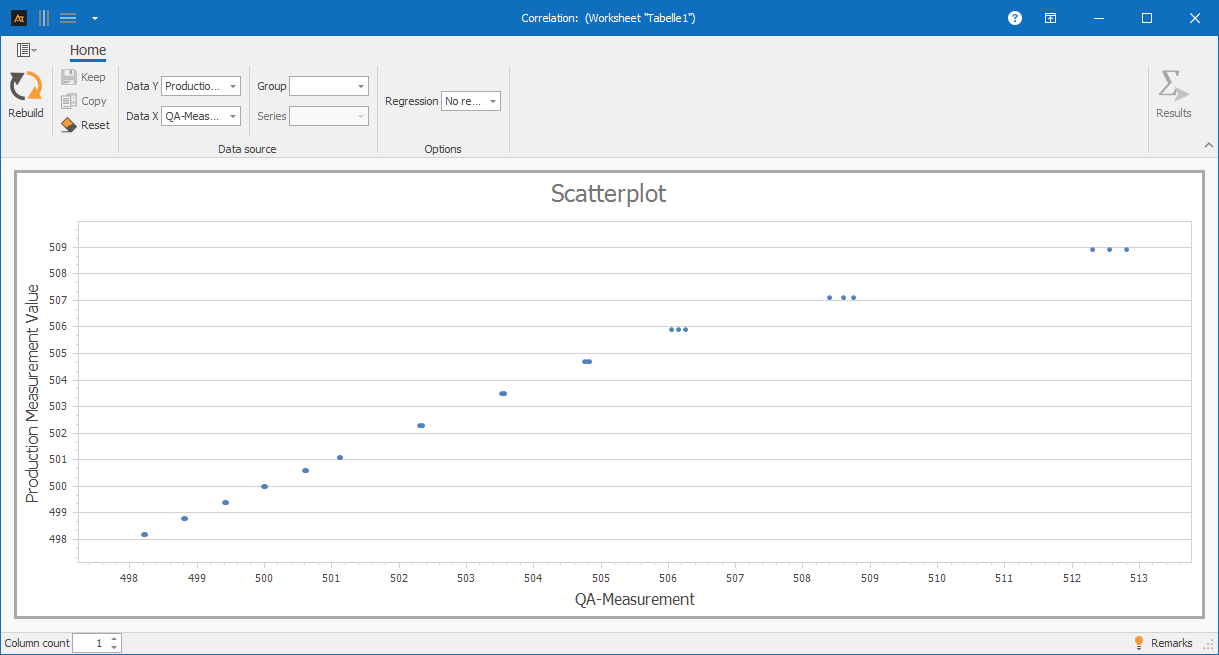
The scatter diagram shows the relationship between the QA measurement value and the production measurement value for the filling quantity.
In the lower measurement range, the production and QA measurement values correspond very well and are approximately on a straight line.
However, at higher measurement values, there is an increasing deviation, with the QA measurement values being higher than the production measurement values.
Production
Impact of maintenance frequency on downtime
In production, the effect of maintenance frequency on unplanned machine downtime is examined.
It is assumed that regular maintenance reduces unplanned downtime, but that this effect diminishes after a certain maintenance frequency.
For several machines, the number of maintenance operations per month and the unplanned downtime during the same period are recorded and documented as a pair of values.
A correlation diagram is used to check whether there is a correlation and whether a saturation effect can be identified.
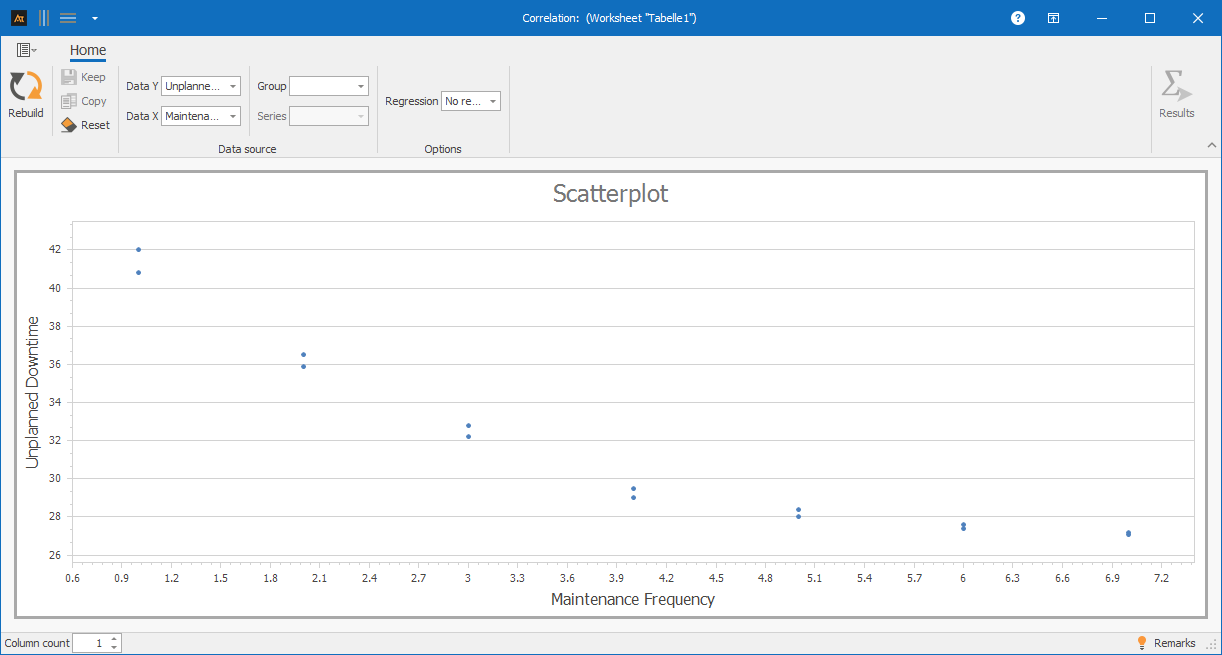
The correlation diagram shows that as the maintenance frequency increases, unplanned downtime initially decreases significantly.
From a maintenance frequency of around 4–5 maintenance operations per month, the effect flattens out, with further maintenance operations leading to only minor additional improvements.
IT support
Processing time for tickets by location
The IT service desk is investigating whether the age of a ticket has an impact on the processing time.
It is assumed that older tickets are often more complex or have been escalated multiple times, resulting in longer processing times.
For several tickets, the ticket age at the time of processing and the actual processing time are recorded and documented as a pair of values.
A correlation diagram is used to check whether there is a correlation between ticket age and processing time.
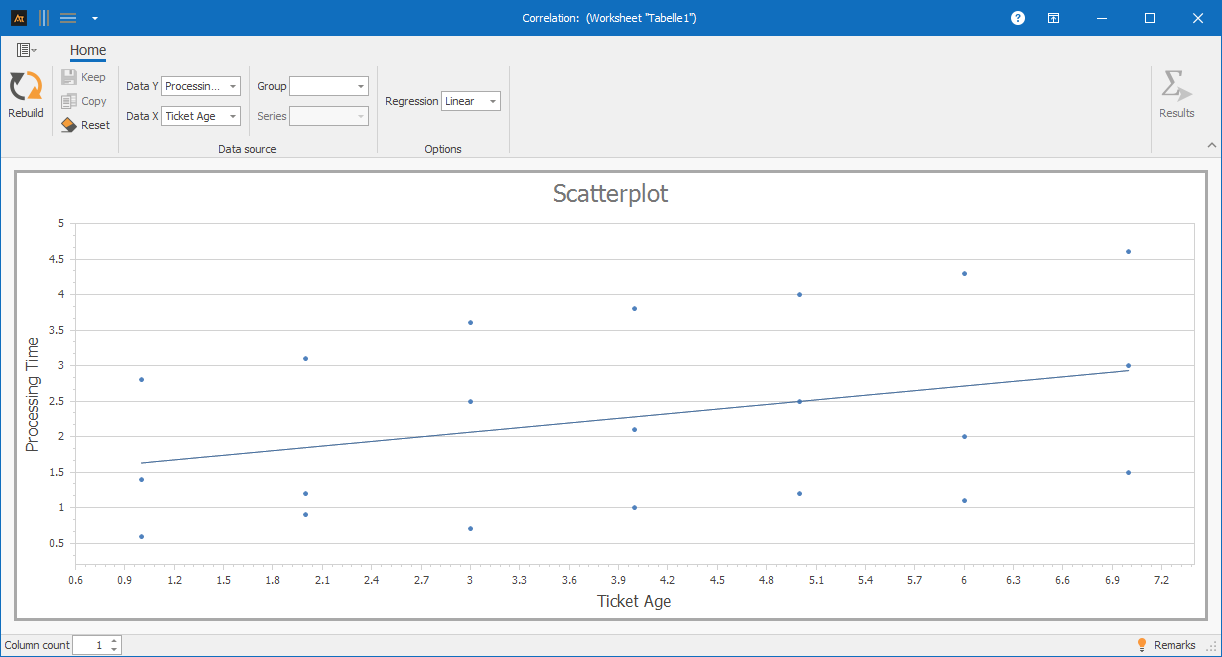
The scatter plot shows a wide variation in processing time across all ticket ages.
There is no clear linear correlation between ticket age and processing time.
Sales
Sales rate vs. offer duration
Sales offers are created for customers in the sales department.
The aim is to investigate whether the duration of the offer process has an impact on the sales rate.
For several offers, the offer duration (time from offer creation to decision) and the resulting sales rate are recorded and documented as a pair of values.
A correlation diagram is used to check whether there is a discernible connection between offer duration and sales rate.
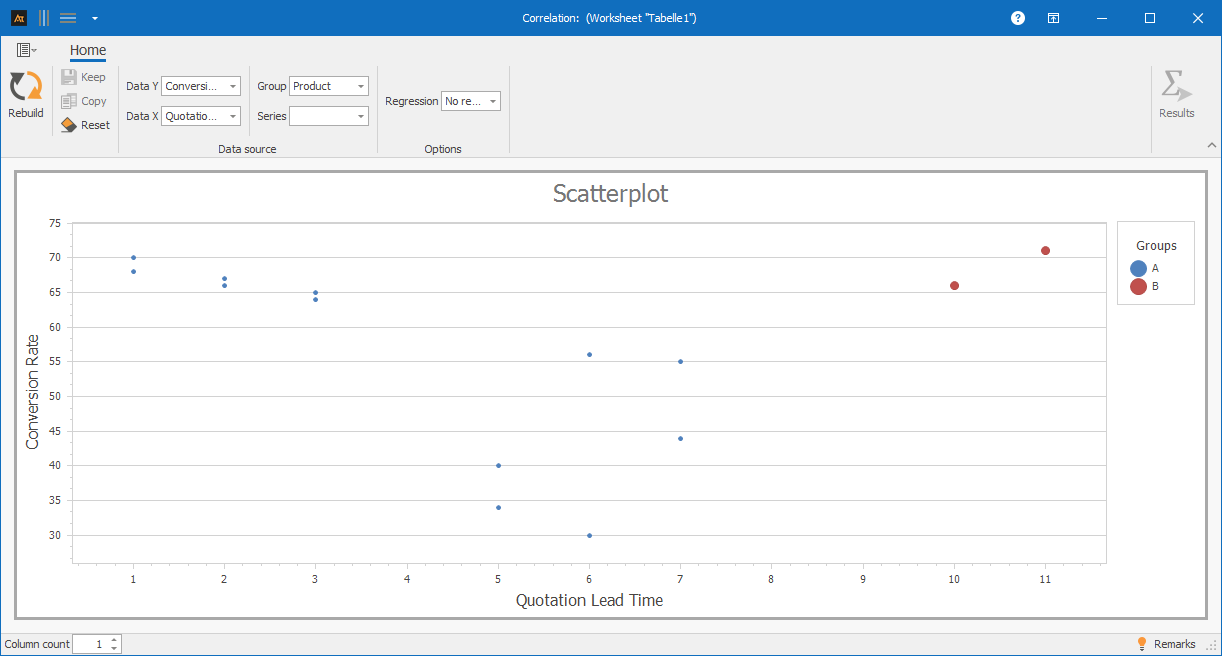
The scatter plot shows the relationship between offer duration and sales rate, separated by products A and B.
For product A, no clear linear relationship can be seen, as the sales rate varies greatly over the offer duration.
Product B, on the other hand, shows higher sales rates for longer offer durations.
The diagram illustrates that the relationship between offer duration and sales rate differs between products.
Logistics
Delivery time to logistics center
In logistics, customer orders are processed across multiple logistics centers.
The aim is to investigate whether the delivery quantity has an impact on the delivery time.
For several orders, the delivery quantity and the actual delivery time are recorded and documented as a pair of values.
A correlation diagram is used to check whether there is a discernible relationship between delivery quantity and delivery time.
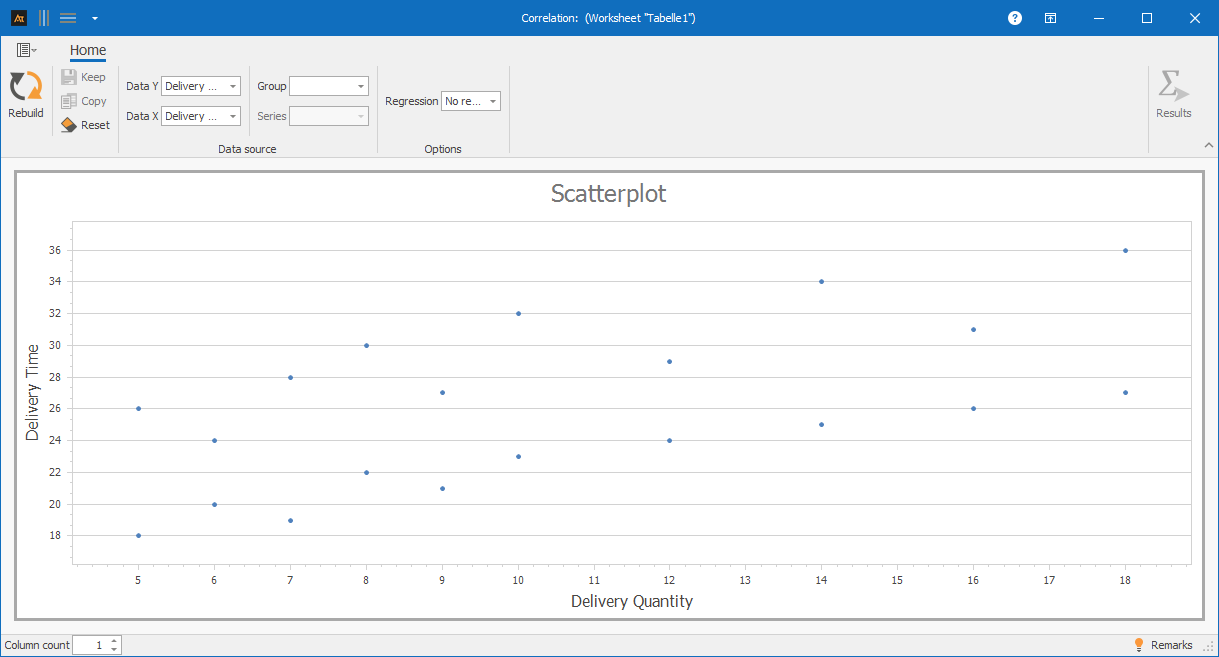
The scatter plot shows the relationship between delivery quantity and delivery time.
The points show a clear dispersion.
No relationship between delivery quantity and delivery time can be identified.
Purchasing
On-time deliveries vs. order time
The purchasing department is investigating whether the length of the order lead time has an impact on on-time delivery.
It is assumed that longer lead times improve planning and thus increase the on-time delivery rate.
For several orders, the lead time (time between order and planned delivery date) and the actual on-time delivery rate are recorded and documented as a pair of values.
A correlation diagram is used to check whether there is a discernible relationship between lead time and on-time delivery rate.
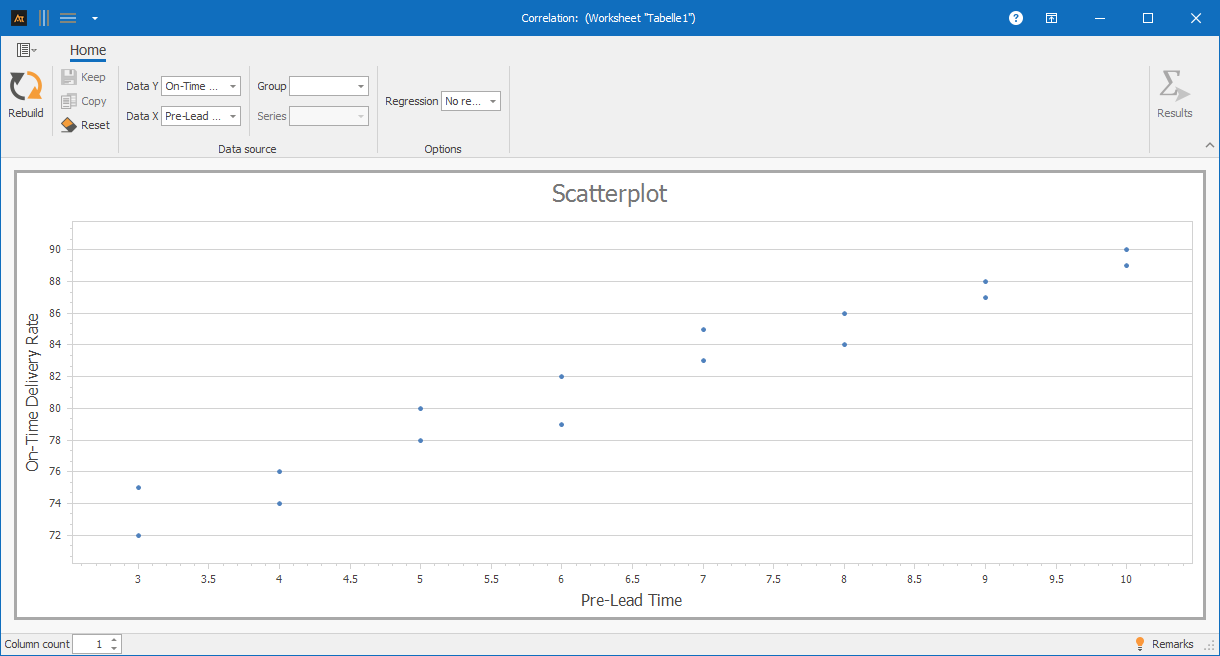
The scatter plot shows a positive correlation between lead time and on-time delivery rate.
As lead time increases, the on-time delivery rate rises.
The points show an upward trend, indicating an approximately linear correlation.
Planning
Forecast deviation
In production planning, forecasts are adjusted using a correction factor to compensate for systematic over- or under-forecasting.
The aim is to investigate how the size of the correction factor applied affects the remaining forecast deviation.
For several forecasts, the correction factor used and the actual forecast deviation are recorded and documented as a pair of values.
A correlation diagram is used to check whether there is a discernible relationship between the correction factor and the forecast deviation.
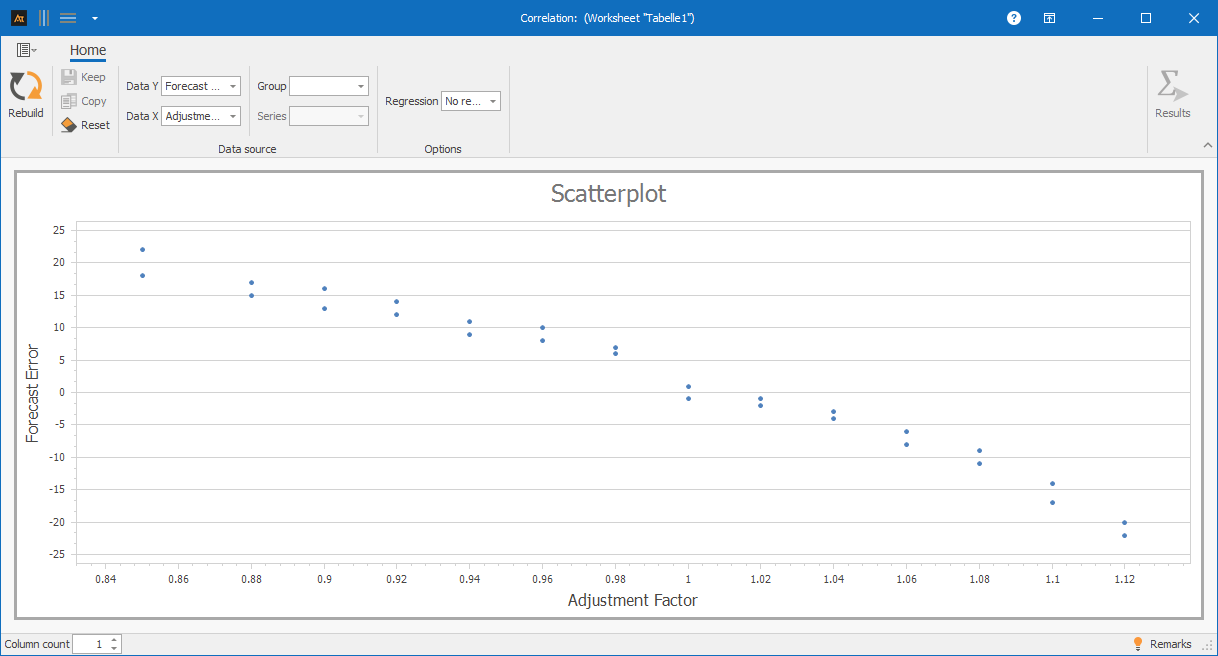
The scatter plot shows the relationship between the correction factor and the forecast deviation.
With low correction factors, the forecast deviation is predominantly positive, indicating an overestimation of demand.
As the correction factor increases, the forecast deviation decreases and is close to 0%in the range around correction factor = 1.00.
For higher correction factors, the forecast deviation becomes increasingly negative, indicating an underestimation of demand.
-
Terms
Correlation diagram: Diagram for the graphical representation of the relationship between two numerical variables.
Scatter diagram: Alternative name for the correlation diagram, in which individual value points are displayed.
Influencing variable (x): Variable whose influence on another variable is being investigated.
Target variable (y): Variable that is to be influenced by the influencing variable.
Value pair: Related measured values from the influencing variable and the target variable.
Linear relationship: Relationship in which the values are approximately arranged along a straight line.
Non-linear relationship: Relationship in which the progression cannot be described by a straight line.
Dispersion: Measure of the distribution of points around a recognizable curve.
Positive correlation: As the x-value increases, the y-value increases.
Negative correlation: As the x-value increases, the y-value decreases.
Correlation: Measure of the strength and direction of a relationship between two variables.
Regression: Method for describing a relationship using a mathematical function.
Causality: Cause-and-effect relationship between two variables that cannot be derived from a correlation diagram.
-
Formulas
Linear model
\( \mathrm{y}=\mathrm{a}_0+\mathrm{a}_1\,\mathrm{x} \)
Quadratic model
\( \mathrm{y}=\mathrm{a}_0+\mathrm{a}_1\,\mathrm{x}+\mathrm{a}_2\,\mathrm{x}^2 \)
Cubic model
\( \mathrm{y}=\mathrm{a}_0+\mathrm{a}_1\,\mathrm{x}+\mathrm{a}_2\,\mathrm{x}^2+\mathrm{a}_3\,\mathrm{x}^3 \)
4th degree polynomial
\( \mathrm{y}=\mathrm{a}_0+\mathrm{a}_1\,\mathrm{x}+\mathrm{a}_2\,\mathrm{x}^2+\mathrm{a}_3\,\mathrm{x}^3+\mathrm{a}_4\,\mathrm{x}^4 \)
5th degree polynomial
\( \mathrm{y}=\mathrm{a}_0+\mathrm{a}_1\,\mathrm{x}+\mathrm{a}_2\,\mathrm{x}^2+\mathrm{a}_3\,\mathrm{x}^3+\mathrm{a}_4\,\mathrm{x}^4+\mathrm{a}_5\,\mathrm{x}^5 \)
6th degree polynomial
\( \mathrm{y}=\mathrm{a}_0+\mathrm{a}_1\,\mathrm{x}+\mathrm{a}_2\,\mathrm{x}^2+\mathrm{a}_3\,\mathrm{x}^3+\mathrm{a}_4\,\mathrm{x}^4+\mathrm{a}_5\,\mathrm{x}^5+\mathrm{a}_6\,\mathrm{x}^6 \)
-
Keywords